
How to Make an Afrobeats Beat With Free Drum and Shaker Loops
Form a band online, promote your music, buy custom beats, sound parts, and share your Beat or Track as a Royalty Free loop with us. Collaborate to make beats online with the best loop makers from around the world on the Forum for musicians and beat makers. Keep up to date with Music News and learn from FL Studio Video Tutorials and the articles on the Blog. Free DAW Music Software downloads, VST and Instrument Packs for FL Studio, Pro Tools, Logic, Ableton, and how to use the most popular free DAW Software, Fruity Loop Plugins, MIDIs and more.
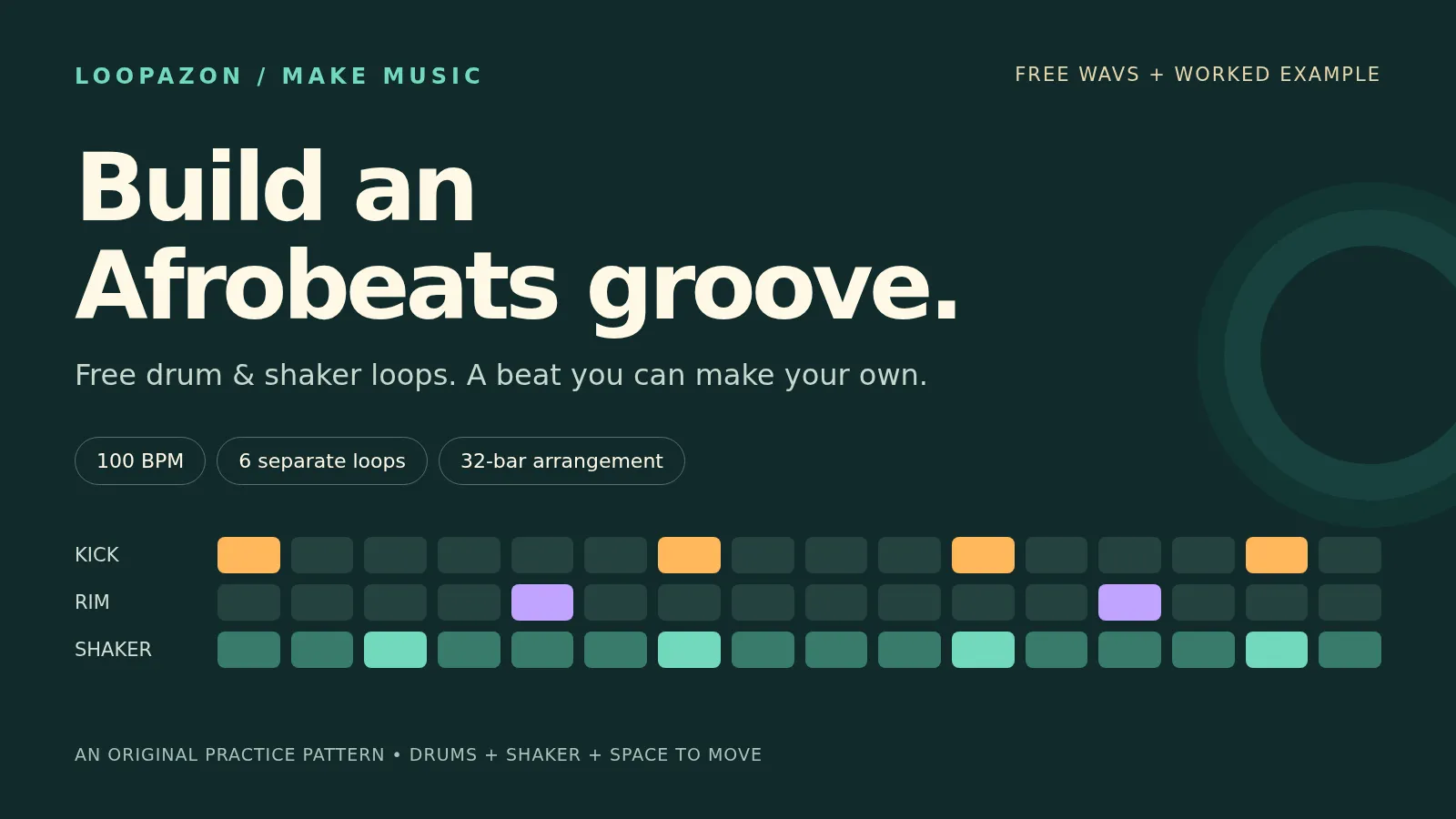
A shaker can change the feel of a beat without changing a single kick. Its quieter strokes fill the spaces between the main hits; its accents give those spaces direction. Learn to hear that relationship, and choosing loops becomes much easier.
In this guide, you will make an Afrobeats-inspired beat at 100 BPM with six free WAV loops. Start with drums and shaker, add bass and harmony, then turn a four-bar idea into a 32-bar arrangement. Download the sounds and listen to the examples as you go.
Hear the beat, then download the free loops
The finished practice arrangement lasts 76.8 seconds. Listen for the drums entering after the intro, the fuller groove at bar 9, and the space created by the breakdown.
Download the reference beat · WAV · Download all six practice loops · ZIP
Every loop is four bars long in 4/4: exactly 9.6 seconds at 100 BPM. The files are stereo, 48 kHz, 24-bit WAV. The bass, chords, and pluck share an A minor chord cycle; the drum and shaker parts do not need a key match.
| Free WAV download | What it contributes | Start with |
|---|---|---|
| Pocket drums | Kick and rim: the main rhythmic outline | Drums alone |
| Shaker | Sixteenth-note movement and offbeat accents | Add to the drums |
| Percussion | A second rhythmic voice | Add after the core groove works |
| Bass · A minor | Low notes supporting the chord movement | Listen with drums and chords |
| Chords · A minor | Am7 → Fmaj7 → Dm7 → Em7 | One chord per bar |
| Pluck · A minor | A short melodic hook | Introduce it in the fuller sections |
These are original programmed sounds made with synthesis and noise for this tutorial. The reference is a render of the supplied loops, separate from the browser-editor walkthrough. It contains no sampled commercial recording and is not a recording of a live band. See the audio notes and arrangement recipe.
Afrobeats and Afrobeat: a useful distinction
Afrobeats is a broad umbrella for contemporary West African pop and its many influences. Afrobeat, without the final “s,” refers to the style pioneered by Fela Kuti. The names are related, but they do not describe one interchangeable drum pattern.
In Splice's interviews with Dunnie, LeriQ, and Mystro, the producers describe a varied sound shaped by groove, melody, and different musical influences. Our exercise explores one approachable groove; it is a starting point for listening and experimenting, not a formula for the whole genre.
1. Choose a drum loop and shaker that leave room for each other
For the quickest start, use the practice files above. To choose your own sounds, browse Loopazon's Afrobeat drum loops and Afrobeat percussion loops. The catalogue uses the singular Afrobeat genre label, so audition each sound for the feel you want.
A concrete shaker option is Rhythmic Heat – Shaker Loop Afrobeat by toloxo, listed at 100 BPM. Treat it as an alternative to audition, rather than one of the sounds in our reference mix.
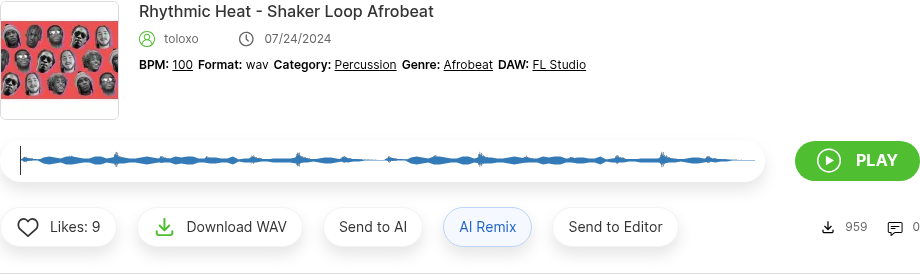
Use a listing's tempo and preview to narrow your choice. A genre label alone does not tell you how two rhythms will fit.
Before downloading a pair, listen for three things:
- Existing high-frequency rhythm. If the drum loop already has a busy shaker or hi-hat, another full shaker may crowd it. A kick-and-rim loop gives you more space.
- The accents. Tap along with the loudest shaker strokes. Do they support the drum feel, or seem to pull in a different direction?
- The phrase length. Two files at 100 BPM can still be two and four bars long. Note where each phrase starts and repeats.
Use Download WAV for a file you can keep. Check the listing's creator notes and licence before using a catalogue sound in a release.
2. Set the tempo and line up the loops
Open the Loopazon AI Audio Editor and use its timeline editor for this exercise. You can also arrange these WAVs in a desktop DAW; our FL Studio loop tutorial explains that workflow.
- Set the timeline editor to 100 BPM before importing the practice files.
- Open Audio Files, then use Upload Audio to import the WAVs one at a time.
- Drag Pocket drums onto an audio track at the beginning of the timeline.
- Use + Add track for each additional part, then drag its file onto that track at the same starting point.
- Keep each original clip at its full 9.6-second length. A four-bar clip starting at bar 1 ends where bar 5 begins.
Start playback with just drums and shaker, then bring in the other parts. Importing at the correct project tempo matters: the browser editor initially associates an imported loop with the current project BPM. For this exercise, leave it at 100.
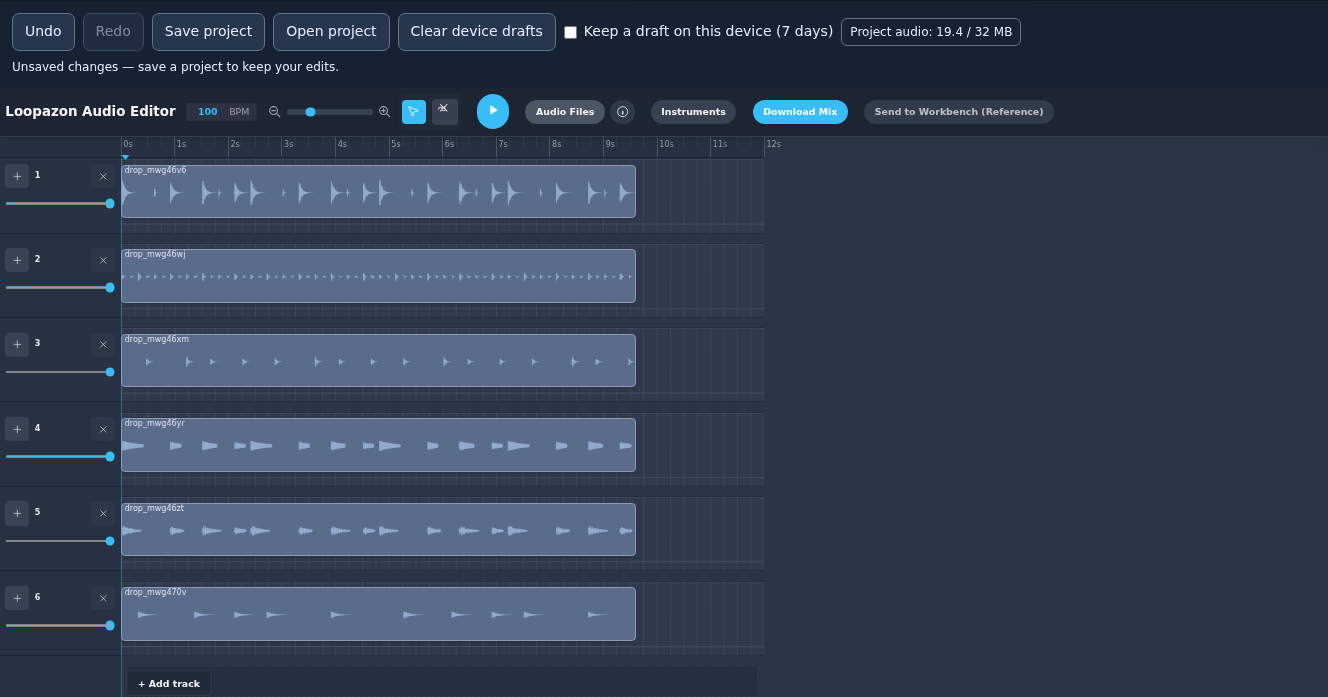
The practice WAVs imported into the live Loopazon editor. Separate tracks let you change the balance and arrangement of each part.
If you use a catalogue card's Send to Editor button instead, look for the sound in Audio Files, then drag it onto a track. For files recorded at another tempo, first match their known bar length with your DAW's time-stretching tools; simply changing a BPM label is not a reliable correction.
3. Hear what the shaker changes
Play these two examples in order. The drum part and its level stay the same; the second example adds only the shaker.
A · Drums alone
B · The same drums with shaker
The kick and rim sketch the larger rhythm. The shaker gives you smaller divisions to move against. In this example, its strongest strokes fall on the “&” between the numbered beats, with quieter strokes in between.
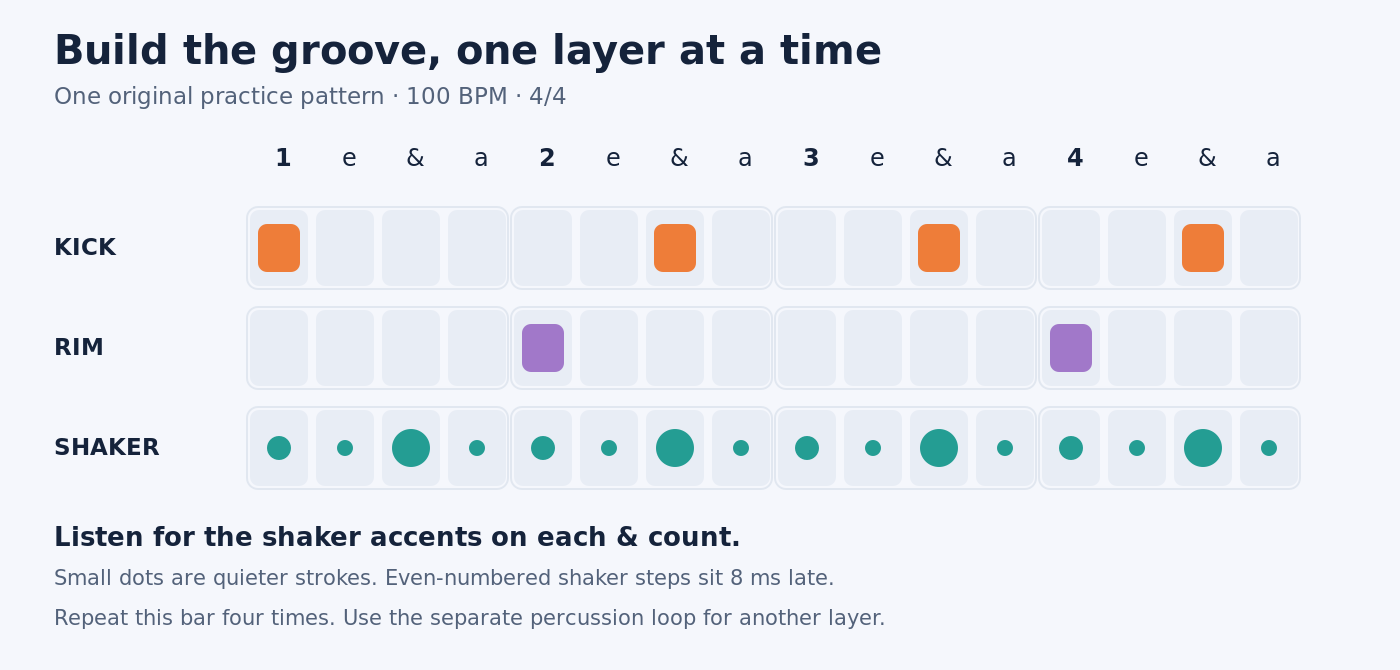
Our practice pattern, shown as sixteen subdivisions of one bar. The numbered beats divide into “1 e & a, 2 e & a, 3 e & a, 4 e & a.” This is a rhythm diagram, not an editor screenshot.
To program a similar starting pattern with your own one-shots, place the kick on steps 1, 7, 11, and 15, and the rim on 5 and 13. Add a shaker on every step, then make steps 3, 7, 11, and 15 louder. Keep the other strokes soft enough that the accents remain audible.
Try lowering the shaker until you almost miss it, then mute and unmute it. If the beat loses movement when it disappears, the shaker is doing useful work. If the beat becomes clearer, try a quieter level or a less crowded loop.
A finished shaker WAV already contains its timing and accents. You cannot change individual stroke velocities with one track-volume control. To reshape those accents, choose another loop, edit individual slices in a DAW, or program a one-shot pattern. Avoid adding swing automatically to a loop that already has a strong rhythmic feel.
4. Add bass, chords, and a short melodic answer
Bring in the supplied chords and bass together. The four-bar cycle is Am7 → Fmaj7 → Dm7 → Em7, with one chord per bar. All pitched parts were written for that cycle, which removes one common beginner problem: matching key labels while accidentally combining different chord progressions.
Keep the bass low enough that you can still hear the kick's attack. If the bottom end becomes blurry, lower the bass first and listen again before reaching for effects. With your own bassline, shorter notes and gaps around important kicks can help the two parts speak clearly.
Add the pluck last. Listen to whether its phrases leave space for a vocal or another lead instrument. You do not need a melody in every section: holding it back is one way to make its arrival noticeable.
Finally, introduce the percussion loop. It should add a separate rhythmic detail rather than bury the shaker. Compare with and without it. Keeping a part out is a valid arrangement choice.
5. Turn four bars into a 32-bar beat
At 100 BPM, each bar lasts 2.4 seconds. Repeat the four-bar clips at the section starts below, placing them end to end. The arrangement finishes at the beginning of bar 33, or 76.8 seconds.
First rearrange the six clips you lined up for auditioning: leave the shaker and chords at the start, move the first drum clip to 9.6 seconds, and move the first bass, percussion, and pluck clips to 19.2 seconds. That gives the intro room to build. To add a repetition in Loopazon, drag the same source from Audio Files onto its track again at the next required start.
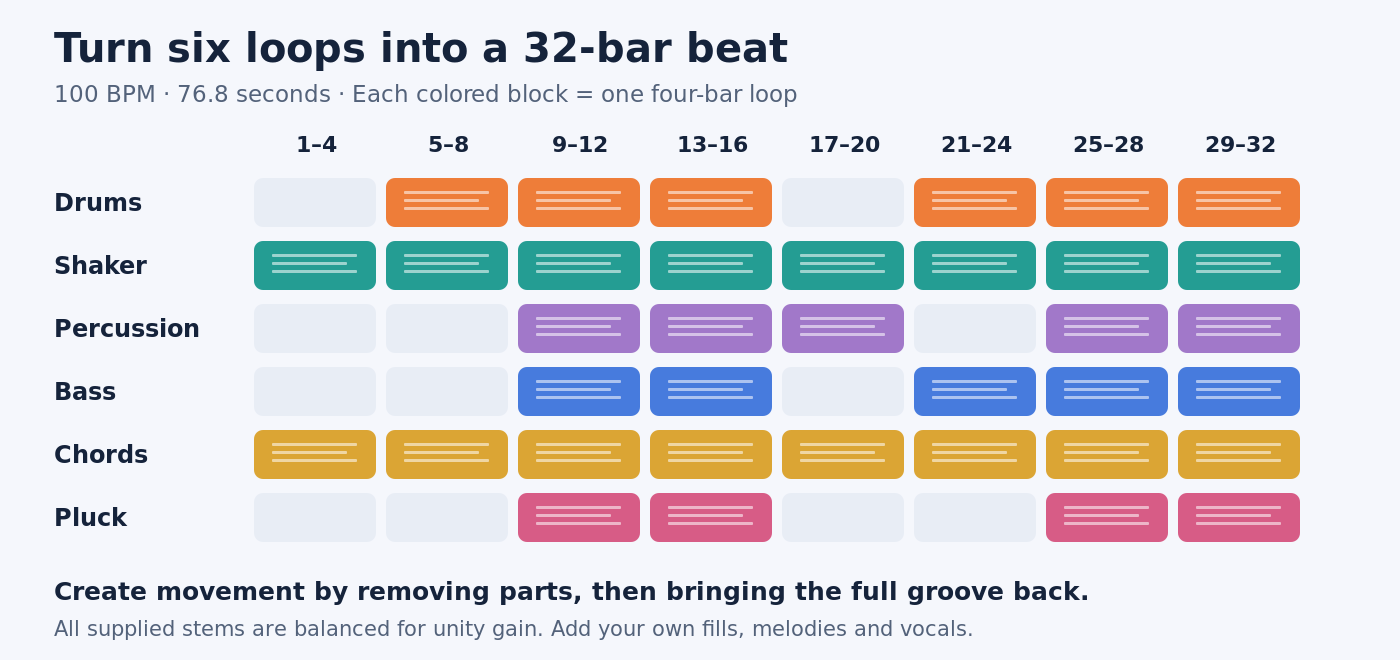
| Bars | Time | Parts to use |
|---|---|---|
| 1–4 · Intro | 0–9.6 sec | Shaker and chords |
| 5–8 · Drums enter | 9.6–19.2 sec | Drums, shaker, chords |
| 9–16 · Full groove | 19.2–38.4 sec | All six parts; repeat each four-bar loop twice |
| 17–20 · Breakdown | 38.4–48 sec | Shaker, chords, percussion |
| 21–24 · Rebuild | 48–57.6 sec | Drums, shaker, bass, chords |
| 25–32 · Return | 57.6–76.8 sec | All six parts; repeat each four-bar loop twice |
In Loopazon, zoom in and use the time ruler to place each copy. The four-bar starts in seconds are 0, 9.6, 19.2, 28.8, 38.4, 48, 57.6, and 67.2. In a desktop DAW with snapping, enable the bar grid to make exact repeats easier.
Listen through the breakdown and return without touching the controls. Does the full groove feel stronger after the quieter section? For a second version, hold the pluck back until bar 29, or remove the percussion from the first full section. Change one thing, save another version, and compare.
6. Balance the tracks and export your beat
The practice files include a starting balance. Begin without extra gain or effects, then adjust for your arrangement and editor's default levels. Bring the shaker forward only as far as the groove needs; a bright sound can become tiring well before the master meter clips.
Check the fullest section with every part playing. If you hear distortion or the master clips, reduce the contributing track levels. Listen at a comfortable volume and check a second playback device before deciding the mix is finished.
Use Save project to download an editable .loopazon project that you can reopen with Open project. Then use the timeline editor's Download Mix to export a WAV. Keep the project file as well as your audio export.
Listen to the downloaded WAV from start to finish, especially the joins between repeated loops and the ending. Keep the original WAVs and arrangement notes too. The downloadable reference follows the table above; your own export can differ as you change the balance and structure.
Quick fixes for drum-and-shaker loops
| What you hear | What to try |
|---|---|
| The loops slowly fall out of time. | Check the source BPM, start point, and bar length. Our unmodified four-bar files should last 9.6 seconds at 100 BPM. |
| The beat feels too busy. | Mute the extra percussion, then check whether the main drum loop already includes a shaker or hi-hat. |
| The shaker sounds harsh. | Lower it first. Try a softer sound before applying large amounts of EQ. |
| The bass and chords disagree. | Check the chord cycle and phrase start, not just the key label. |
| A repeat clicks or leaves a gap. | Check that the full clip reaches the next boundary without overlap. Inspect any cuts and use short fades where needed. |
Questions about free Afrobeats loops
What BPM should I use?
Use 100 BPM to follow this tutorial without stretching the supplied files. It is a practical starting tempo for this example, not a requirement for every Afrobeats track. Choose another tempo when it serves your own groove.
Can I use these loops in a commercial song?
The practice pack licence permits non-exclusive use in personal and commercial music projects. It does not permit selling or redistributing the sounds as a standalone sample library. For catalogue downloads, check the individual listing and Loopazon's loop licence information, including any requested creator credit.
Can I use the loops in FL Studio or another DAW?
Yes. These are standard WAV audio files. Import them onto separate audio tracks, set the project to 100 BPM, and align the four-bar phrases. A loop does not have to be made in your DAW to work in it.
Can I use Loopazon's AI tools as well?
You can explore an idea in the AI Workbench and export its mix for arranging. Keep the six individual practice WAVs when you want separate control of drums, shaker, bass, and melody: a Workbench mix transfers as one combined clip. See the illustrated guide to Loopazon's AI and editor tools for those steps.
Once the reference arrangement works, replace one sound with a loop you love. Keep listening to the relationship between the drum accents, shaker movement, and spaces in the melody. That is where this exercise becomes your own beat.